

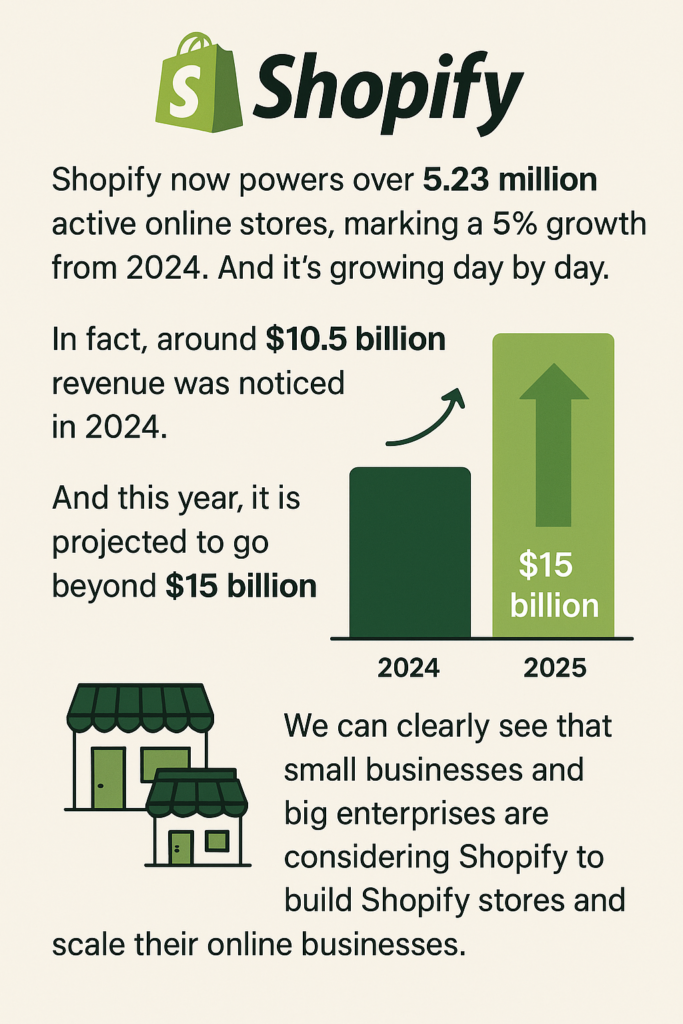
 Shopify now powers over 5.23 million active online stores, marking a 5% growth from 2024. And it’s growing day by day. In fact, around $10.5 billion revenue was noticed in 2024. And this year, it is projected to go beyond $15 billion. We can clearly see that small businesses and big enterprises are considering Shopify to build Shopify stores and scale their online businesses.
It’s one of the world’s most trusted eCommerce platforms, and with good reason. But when it comes to the back side of the story, running a successful Shopify store has not always been as easy as it looks.
Even as more people build a Shopify store, many still struggle to make it run smoothly. Slow loading times, poor SEO, low conversions, and technical glitches are very common. And if not addressed early, these issues can quietly kill your store’s reputation.
In this blog, we are going to break down 10+ common Shopify store challenges that you might be facing and offer hands-on tips on how to solve them. These solutions are simple, effective, and designed to help you grow your eCommerce business.
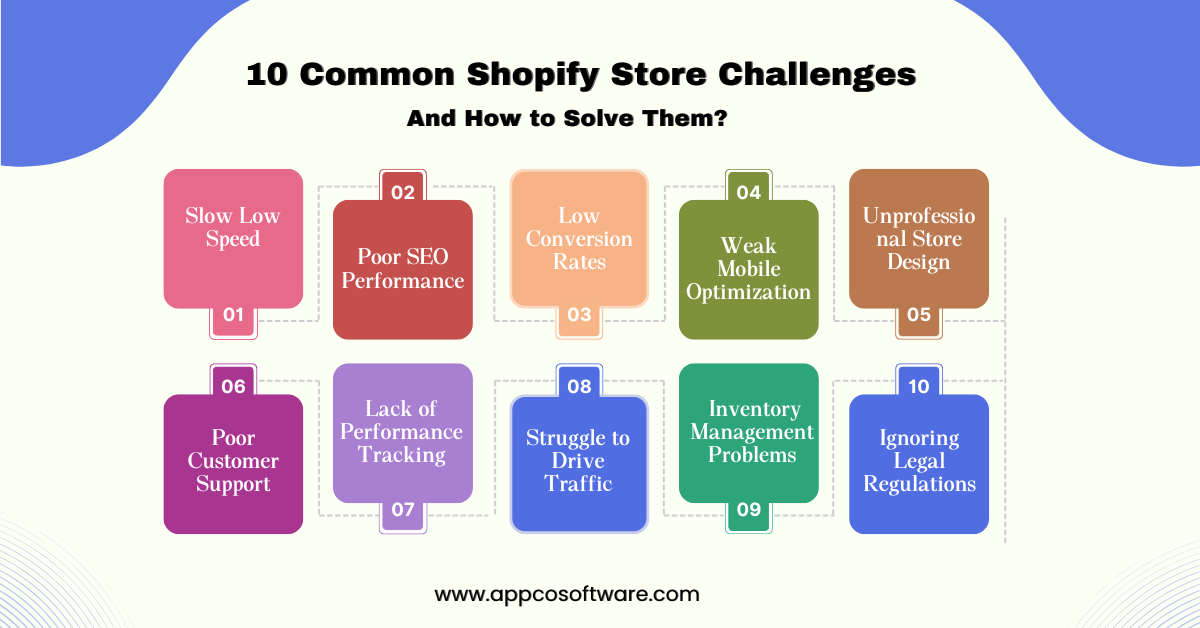
Have you ever clicked on a Shopify store and waited a few seconds to view everything on the page, but the content loaded slowly?
It’s really annoying when we are about to buy something, and we face such speed issues. In the same way, when your Shopify store setup takes too much time to load, your potential visitors feel the same way. Google says a slow website doesn’t just frustrate users – it directly impacts your sales.
Because your major traffic comes from Google itself, and Google cares about site speed a lot. So, if your Shopify website is getting crawled, both your customers and Google will ignore you.
SEO is the second most common challenge that almost every Shopify owner faces. Despite the fact that Shopify does offer some of the great apps and tools, many businesses fail to really optimize it well.
So, if you’re not visible on search engines, your traffic and sales will be low. Shopify SEO issues are usually caused by poor keyword targeting, weak content, and missing metadata. Your site might lack backlinks or have pages that Google struggles to index.
Sometimes, the structure of your store (like messy URLs or missing internal links) can also push you down in the rankings. Without proper Shopify store optimization for SEO, your competitors will outrank you, even if your products are better.
It’s one of the most painful parts of running a Shopify business website. You watch people browse in the analytics reports, add products to their carts, and then go away without buying.
But as a Shopify owner, you must know that low conversion rates are basically caused by too much friction during the checkout process, hidden fees, a lack of trust signals, or unclear product descriptions.
Your potential buyers need to feel confident and comfortable when they make a purchase. If your store makes them think twice or gets in their way, they’ll back out. Making it super easy and reliable for customers to hit the “buy now” button is key to increasing conversion rates on Shopify.
If you’re a new seller on Shopify, you might be surprised to know that more than half of visitors come from mobile phones. If your Shopify store is not responsive or does not work smoothly on mobile screens, you’re losing potential customers.
Above all, if your Shopify business website is not responsive on a small screen, your potential buyers may instantly leave. For example, buttons can be too small, text can overlap with other sections, or the checkout page can be hard to navigate. All of these issues can kill trust and conversions. Shopify website developers often emphasize mobile-first design because that’s where most eCommerce happens today.
Sometimes everything feels so right, like products, supply chain, but if your Shopify business website looks outdated, cluttered, or unpleasant, your customers may not buy from you. As we have heard many times, that first impression is everything.
And that’s true in Shopify also. Poor design makes your store seem less trustworthy, and that’s enough for people to close the tab and choose another seller.
In a good Shopify store, you can notice that layout, typography, colors, and images are all aligned well, which creates a professional look. With our decade of experience, we can confidently say that if your store doesn’t look reliable, customers won’t want to buy from you. Customers judge what you sell by the look and feel of your store. Trust is more important than design alone.
Customer service can make or break a Shopify store. Even if your products are good, a single bad support experience can turn potential consumers away. People want answers as soon as possible. If your response is slow or your tone is unfriendly, it shows negatively on your company.
And with so many possibilities online, they’ll simply shop elsewhere. Poor service also results in missed opportunities, such as upselling, creating loyalty, or converting a complaint into something positive. Long-term success requires solid customer relationships. That is why increasing customer service should be at the top of your Shopify store’s optimization goals.
Running a Shopify store without tracking performance would be similar to flying in the dark. You won’t know which products are popular, where the traffic is coming from, or why customers leave without purchasing. Analytics alone don’t tell the whole story. What really matters is using that data to make smarter decisions.
If you don’t look at the figures, you’re passing up easy opportunities and losing income as a result of unnoticed mistakes. Conversion rates, bounce rates, traffic sources, and high-performing goods all tell what happened. And, once you know the story, you may modify the ending. Every successful Shopify business website uses tracking to grow.
Building a good-looking Shopify store alone doesn’t help you sell like crazy. It doesn’t matter how good your products are if you don’t attract any traffic. This is one of the most aggravating Shopify store difficulties for both new and old sellers.
Visibility is important. People cannot buy from you if they are unable to find you. Driving traffic needs a combination of organic and paid strategies. You must get your store in front of the right audience at the right time. And the key is to be consistent in your efforts.
Inventory problems are more common than most Shopify sellers realize. Sometimes you run out of stock and lose a sale. Other times, you’re stuck with products nobody’s buying, and your money gets tied up.
Both situations are annoying.
When loyal customers don’t find what they came for, they move on. And when your stockroom is packed with stuff that’s not moving, you’re paying extra for storage space that’s not helping your growth. That’s why inventory management is more important than counting it.
To run a successful Shopify store, you need to understand what is selling more, how your potential customers are experiencing the purchase, and what their demand is. And after knowing all of this data, you must keep your systems in sync. If your inventory and sales channels don’t sync properly, you risk delays, errors, and financial loss.
This may not seem important to you right now, but legal requirements can ruin everything, especially if you’re just starting out and don’t know enough about the market. And that’s why ignoring the legal side of a Shopify store is sometimes risky. You could end up paying a lot of fines, having your store shut down, or losing customer trust.
Privacy policy and payment terms & conditions, for example, are the important things you need to check from the very beginning. And if you’re selling internationally and you’re doing good there, you must understand local laws and data regulations.
Also Read – Top 10 Shopify Development Companies in Mumbai
As a leading Shopify development agency, we at Appco Software know that running a Shopify store hasn’t always been a smooth journey. Our team of certified Shopify developers is not only developers, but they’re your dedicated problem-solving partners.
No matter if the speed of your store is pretty slow, if it’s not showing up on Search Engine Results Pages (SERPs), or maybe you have been experiencing a custom Shopify store challenge, we know exactly what needs to be fixed.
Our team works closely with you to figure out what is wrong and, more importantly, how to solve it. We can help you with anything from Shopify speed optimization and SEO improvements to design changes, product organization, and checkout problems. We can also help you with starting a store from scratch or redesigning an existing one to make it faster, cleaner, and more effective.
Every Shopify store comes with its own challenges, but the good news is that most of them can be resolved without starting completely over. Whether you’re struggling with slow loading, payment integration or maybe inventory issues, there are clear steps you can take to improve your store and your sales.
If you feel stuck, working with expert Shopify website developers or optimization specialists can make a huge difference.
Having said that, if you’re looking for a top Shopify agency, Appco Software is here to help you fix all of the problems mentioned above. We’ve been building Shopify stores for over a decade now, and our Shopify team is an expert at what they do.
1. How can I improve my Shopify site speed without hiring a developer?
Start by making photos smaller, removing unnecessary apps, and setting up a fast-loading theme. You can also use built-in Shopify speed optimization tools to find and resolve speed issues.
2. What is the best strategy to optimize the SEO of your Shopify store?
Focus on creating unique product descriptions, optimizing meta titles and image alt text, and cleaning up URL structures. In addition, you can consider creating a blog to attract organic visitors with useful content.
3. How can I improve low conversion rates on my Shopify store?
Start by improving your checkout process, adding reliable features like reviews and guarantees, and testing different CTAs and product page layouts. Always check analytics to find out where users drop off.
4. Can I fully customize my Shopify store without coding?
To some extent, yes. The design can be customized using drag-and-drop tools in builders like PageFly or Shogun. But for more advanced changes, it’s recommended to hire an expert Shopify developer.
5. How often should I audit my Shopify store?
At least once every three months. Regular audits allow you to spot problems early, such as broken links, SEO gaps, or performance issues, and keep your store running smoothly.
6. What should I do if my product pages aren’t getting enough traffic?
If your product pages are not getting enough traffic, you need to make sure that each page has a clear meta title, meta description, and high-intent keywords. Also, add internal links and upload updated sitemap files. These are little aspects of Shopify website setup that helps you get more traffic.
7. Why do customers leave without purchasing even after adding items to the cart?
It could be due to additional fees at the checkout, slow loading times, or a lack of trust. Fixing these issues improves Shopify conversion rates without needing major changes.
8. How can I make my Shopify store more user-friendly?
To make your story more user-friendly, begin with a clean layout, easy access, and pages that load instantly. Simple design choices are a big part of Shopify store optimization, especially for mobile users.
9. My store works fine but sales are still low. What am I missing?
You may be ignoring minor technical glitches or user experience issues. This is where basic eCommerce troubleshooting comes in and finds out what’s really hurting your conversions.

Comment (1)
Ethan Walker
July 10, 2025Great breakdown of the challenges many Shopify store owners face—especially with custom features, speed optimization, and third-party app issues.