
Traffic is coming but sales are not growing. You think maybe the product is wrong or the price needs to change. We hear this from clients all the time. And in most cases, none of that is the actual issue.
The store is just slow. Google has said it clearly. Pages taking more than 3 seconds to open on mobile, more than half the visitors leave. And every extra second cuts conversions by around 7%. So when your Shopify store is loading slow, you are losing real orders every day.
We have seen this with fashion stores, jewelry brands, electronics, and home decor. Same problem everywhere. And fixing a Shopify store running slow rarely needed a redesign. Just finding what was making it heavy and removing it.
Before we go to the problems, let us first understand what a slow Shopify store is truly costing you.
Think about it from the customer’s side. They clicked your ad or found you on Google. The page is opening. Five seconds pass. They close it and go somewhere else. That is it. No second chance. Shopify page speed issues on product pages and checkout pages are quietly killing conversion rates for so many stores, and the owner is busy changing the product price thinking that is the problem.
Google uses Core Web Vitals to decide rankings. Things like:
If your Shopify core web vitals scores are poor, Google will push your competitor’s store above yours in the results. Products do not matter at that point. Speed does. And since Google switched to mobile-first indexing, your mobile speed is what Google is judging, not your desktop.
You are running Meta ads or Google ads, spending money every day to bring people to your store. And those people are landing on a slow page and leaving in two or three seconds. Your bounce rate goes up, your ROAS comes down, and your cost per sale keeps increasing. A slow store does not just hurt organic traffic. It makes every rupee you spend on ads less effective.
If your store is showing any of these signs, the first thing we suggest is a proper Shopify speed audit before touching anything else.
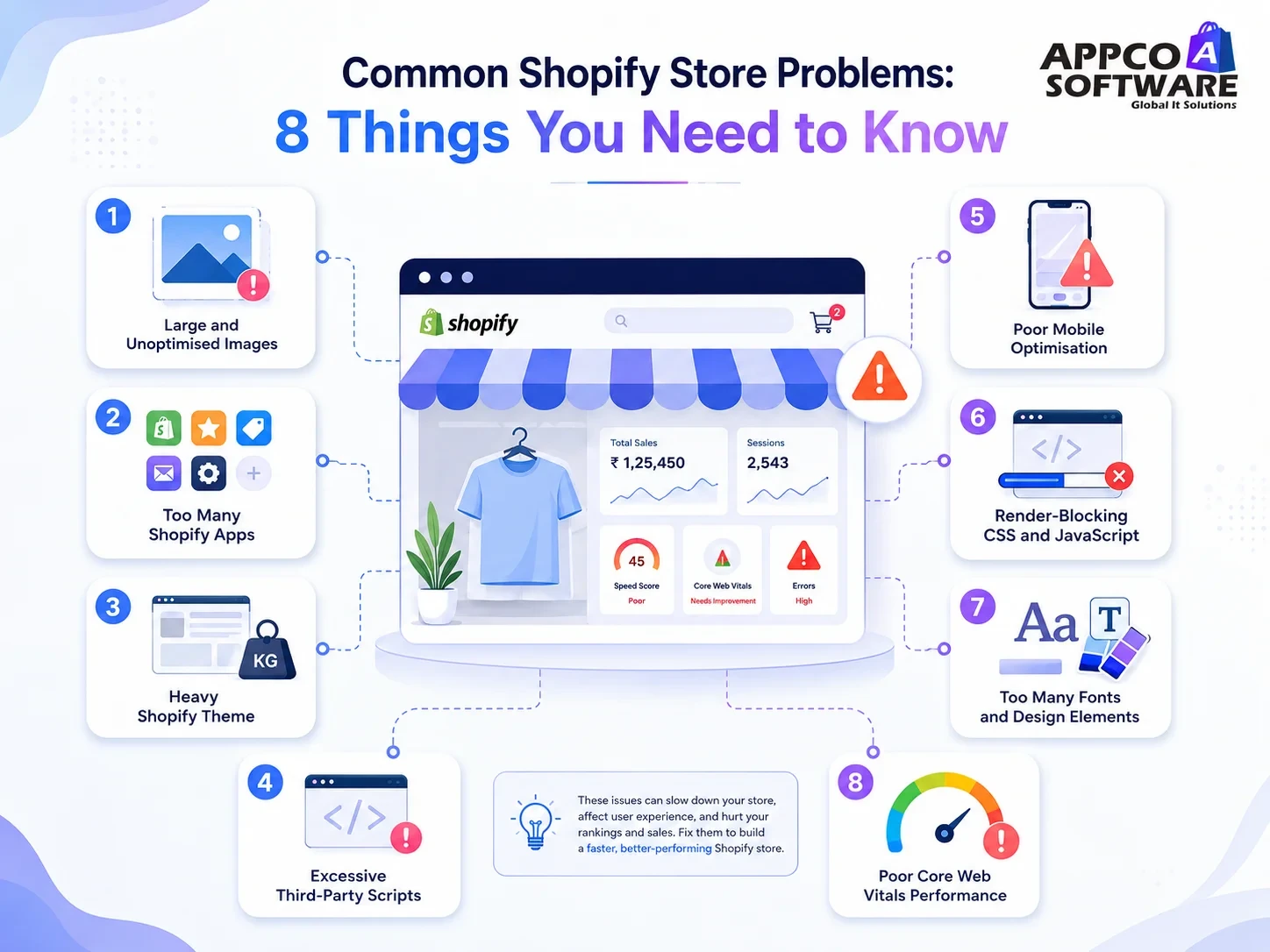
If you want to know how to speed up a Shopify store, here you go. Check each point carefully.
This is the number one reason behind a Shopify store running slow. And also the easiest to fix.
What you will notice: Product pages take too long to open. On mobile, images load in a blurry way first and then become clear. The desktop is fine, but the mobile is very slow.
Every app you install on your store adds its own scripts. And these scripts load on every single page, every single time someone visits. Even apps you stopped using months ago are still running their code in the background.
For stores that need many features, custom Shopify app development that combines several functions into one solution is much cleaner than stacking ten different third-party apps.
A premium theme with many features is not always a fast theme. Many popular Shopify themes come loaded with animations, sliders, and JavaScript for features that most stores will never use. But all of that code still loads on every page.
What you will notice: PageSpeed Insights shows high JavaScript execution time. Your homepage is slow even when your images are small. Google Lighthouse shows long main thread blocking time.
Sometimes the theme has been customised so many times over the years that cleaning it becomes harder than rebuilding it. In those cases, rebuilding the store on a leaner base theme gives better long-term results. Our Shopify store development team has seen stores carrying over 180KB of CSS for features they are not using at all.
A lot of third-party scripts can decrease the overall loading speed. That is why you should use the required apps only. If five or six apps are running together at the same time, your Shopify performance will take a real hit, especially for visitors on mobile connections.
What you will notice: Open the Network tab in your browser’s developer tools and you will see requests going out to five or six external websites just from one page load. PageSpeed Insights will flag render-blocking resources coming from third-party domains.
Your Shopify store running slow only on mobile while the desktop feels fine is a specific problem. And many store owners do not realise it until they test on a real phone.
What you will notice: Your mobile PageSpeed score is 20 to 30 points lower than your desktop score. Visitors on mobile leave much faster than visitors on desktop.
Why does Shopify load slowly on mobile? Mobile phones have slower processors than desktop computers. And many visitors are on 4G or even slower connections. Scripts and images that a desktop handles without any trouble can take twice as long on a normal Android phone. So what feels fast to you when you test on your office laptop or iPhone may feel very slow to your customer on a mid-range phone.
When your store loads, the browser reads CSS and JavaScript files before it shows any content to the visitor. If these files are large or poorly organised, the visitor sees a blank or half-loaded page for a moment before anything appears. This is what causes a high First Contentful Paint score.
What you will notice: PageSpeed Insights shows a warning about render-blocking resources. Your page appears blank or incomplete for a visible moment before content shows up.
Fonts are something most people never think about when checking speed. But each font family and each weight variation, like regular, bold, and italic is a separate file your visitor’s browser has to download. A store using five font families in three weights each is loading fifteen separate font files on every page.
What you will notice: The page visually renders slowly. Text appears in a generic font for a second and then jumps to the correct font. This is called FOUT, Flash of Unstyled Text, and it happens because font files are still downloading.
Core Web Vitals are how Google generally measures the experience of visiting your store. Three numbers matter.
Improving Shopify core web vitals is ongoing work. Our Shopify SEO services include Core Web Vitals monitoring as part of regular technical SEO work so your scores stay healthy after the initial fix.
Go through these before and after any speed work on your store.
Here is what happened on one of our client projects.
| Metric | Before | After |
| PageSpeed Score (Mobile) | 32 | 82+ |
| LCP | 6.1s | 2.1s |
| Bounce Rate | 67% | Reduced significantly |
This store had unoptimised images across more than 300 products, eleven apps loading scripts on every page, and a theme carrying unused sections with over 180KB of extra JavaScript. We handled image conversion, removed unused apps, cleaned the theme code, and deferred third-party scripts. Just targeted Shopify performance optimization work on what was already there.
In order to improve Shopify website speed, image compression and removing unused apps, yes that helps. But after a point, those basic things stop making a real difference. The problem is now inside the theme code. Scripts loading in the wrong order. Core Web Vitals failing and PageSpeed Insights is showing the warning but not really telling you where exactly to look. That kind of work needs someone who has done this before.
Some clear signs you should bring in a specialist:
DIY gets you 10 to 15 points improvement on average. A proper technical audit gets you 30 to 50. That difference is what actually shows up in your Google rankings and in your monthly sales numbers.
We handle Shopify store speed optimization for D2C brands, fashion stores, jewelry brands, and B2B stores across India and international markets. Our process starts with a full speed audit to find exactly what is causing the drag. Then we fix it. And we monitor Core Web Vitals every month so the improvements hold.
If your store needs a full rebuild to fix structural speed issues, our Shopify store redesign service handles that as a combined project. If the structure is fine and only performance needs work, we go straight into the technical fixes.
Get in touch with us for a free Shopify speed audit. We will go through your store, tell you exactly what is pulling your score down, and give you a clear plan to fix it.
First of all, convert the images to WebP and turn on lazy loading. Then remove every app you are not actively using right now. After that open PageSpeed Insights and see what it is showing.
Above 70 on mobile is okay. Above 80 is where you start seeing better rankings and more sales. Below 50 means something is seriously wrong and needs fixing soon.
Your desktop is powerful and probably on a fast WiFi connection. Your customer is on a mid-range Android phone on 4G. Same store, completely different experience. Test on a real phone and you will see the difference yourself.
Once a month minimum. And every time you add a new app or change something in the theme, run PageSpeed Insights again. Small changes add up over time without you realising it.
Yes. Google has confirmed Core Web Vitals as a ranking factor. If your LCP is slow or your page jumps around while loading, Google will rank a faster store above yours.
If your score is below 50 on mobile and you have already tried the basic things, then yes. Some problems are inside the theme code and script loading order. Those need a developer to fix properly.
Error: Contact form not found.

Appco Software has been around for a very long time, helping startups and established brands build iconic websites and apps. For your unique idea to be presented in a beautiful way, contact us now!