

Around 64% of eCommerce traffic will come from mobile devices only in 2025. And slow-loading mobile sites are still the top reason users drop out without buying. Because people these days don’t have that much time to wait for your Shopify store to load. And according to a study, if your site takes more than 3 seconds to load, most visitors are already gone.
And yet, so many Shopify store owners are unaware of this fact.
You might be running ads, spending money on SEO, and adding new products every day. But if your site speed is not where it should be, you’re leaving sales on the table.
We’ll show you, in this guide, how to speed up your Shopify store using the same tips and tools the pros use. Let’s get into it.
A Shopify store is an online shop you can launch without coding or building anything from scratch. It’s one of the easiest and fastest ways to sell products online. It doesn’t matter if you’re running a small business, doing dropshipping, or just testing an idea; Shopify is the best option out there. As of 2025, Shopify powers over 5.23 million live websites around the world.
With Shopify, you get all the options like product pages, a secure checkout, payment systems, inventory management, and even tools for shipping and taxes. And that is why, maybe, a huge number of beginners and growing businesses choose Shopify as their preferred eCommerce platform.
The platform is solid, though, but your store still needs to be done right. A slow, cluttered site will still lose sales, no matter how good your product is. Reports show that sites loading in under 3 seconds convert 40% better than slow ones. So, whether you’re doing it yourself or hiring a Shopify website design agency, focus on clean design, mobile speed, and structure.
If you’re selling online in 2025, speed is no longer just an optional feature; it is a necessity.
As discussed above, more than 68% of all shopping traffic is mobile, and most people won’t wait more than 2–3 seconds for a page to load. That means your store has about the same amount of time as a skipped ad on YouTube before someone bounces.
And the slow Shopify store ranks lower in search engine results. Google’s Core Web Vitals still tracks speed and performance as key ranking factors. If your site lags, your organic traffic will suffer, no matter how great your SEO is.
It’s even more critical now with voice assistants and AI-driven tools. When someone says, “Hey Siri, find a cotton kurta under 800,” voice engines prioritize fast-loading, optimized stores with better mobile usability. If your Shopify store is filled with unnecessary apps and loads like it’s stuck in 2016, you will not be able to sell anything.
And speed affects everything else, too:
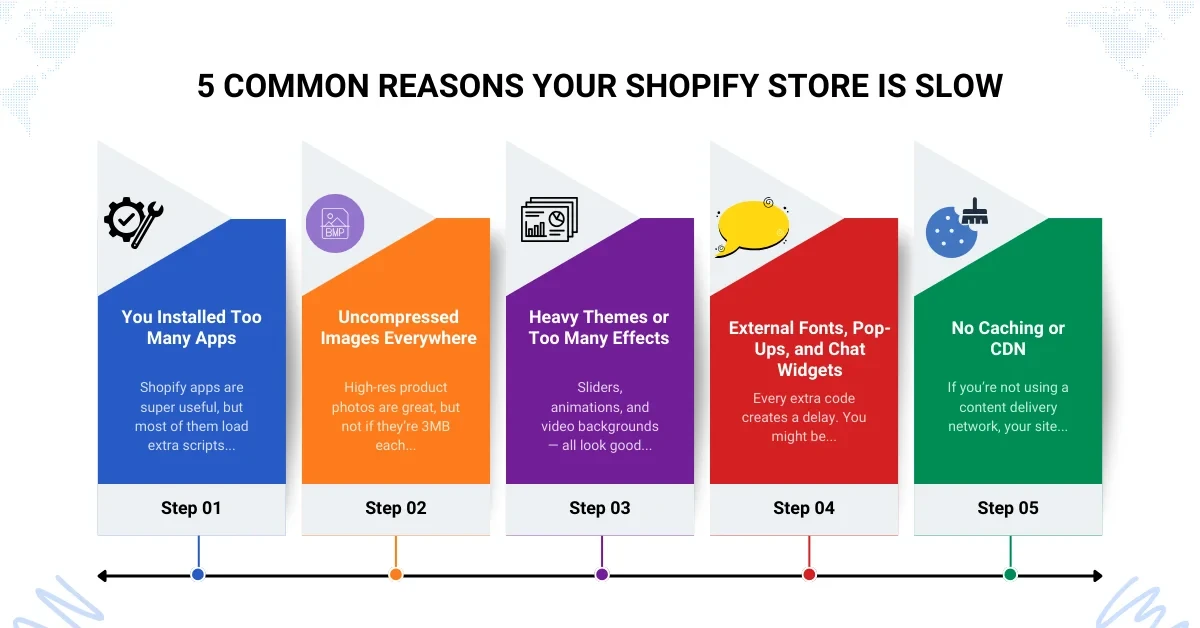
If your store has a beautiful design but still loads like it’s stuck on 2G, chances are there’s something behind the scenes that’s dragging it down. And the truth is, most Shopify store speed issues come from the same 5–6 problems.
Shopify apps are super useful, but most of them load extra scripts every time someone visits your site. That means more requests, more code, and slower pages.
High-res product photos are great, but not if they’re 3MB each. You don’t need billboard-quality images for a phone screen.
Sliders, animations, and video backgrounds — all look good, but feel slow. A heavy theme with too many built-in features can slow down your site without you realizing it. Clean themes load faster and are easier to manage.
Every extra code creates a delay. You might be using five different fonts or running three pop-ups and two chat tools.
If you’re not using a content delivery network, your site loads more slowly for people far from your server. CDNs like Cloudflare help speed things up globally, and often for free.
Also Read – Shopify Speed Optimization Services Improve Checkout Conversion Rates
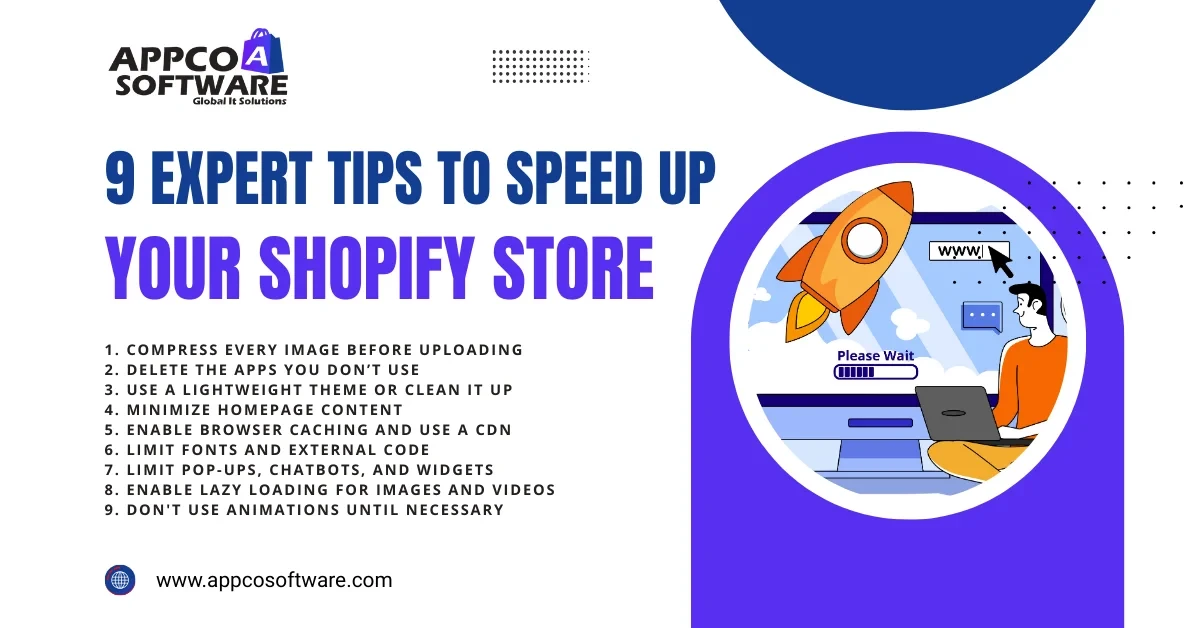
If your store appears to be performing well but is loading slowly, you don’t need a full redesign. You just need the right fixes. Below are the exact things we do when clients come to us for Shopify speed optimization. Let’s go step-by-step.
Uncompressed images are the number 1 reason most Shopify sites feel very slow. You upload one gorgeous banner image up to 3MB, then a few high-res product shots, and before you know it, your homepage weighs in more than a Netflix episode.
Fix it:
Pro tip: Add “lazy loading” to images so they load only when someone scrolls. Less strain, faster loads.
Every app you install runs code in the background, even if you’re not actively using it. That code adds weight to your page and slows everything down.
Fix it:
Some themes are too large. These themes, for example, come loaded with carousels, countdown timers, and animation libraries you’ll never use.
Fix it:
You should not treat your homepage as a catalog. You should use it to hook the visitor, not to display more than 50 products.
Fix it:
If your store doesn’t use caching, your customers have to re-download everything every single time they visit. You’re increasing your Shopify store’s load by doing that.
Fix it:
As we said above, if you are using more than five different fonts at the same time, and if you are pulling codes from Instagram, TikTok, and Google all at once, the performance will be affected.
Fix it:
That chatbot might look helpful, but if it’s dragging your load time, it’s doing more harm than good.
Fix it:
This is the very step we take when a new site speed optimization project comes in. Because this one is low effort, but does deliver high results. Lazy loading means that images don’t load until someone scrolls to them.
Fix it:
Animations are really great elements to have in a website. But when it comes to a Shopify store, adding animations might not be a good idea. You should not bother with it unless it is driving clicks or improving user experience.
Fix it:
If you’re trying to figure out how fast (or slow) your Shopify store really is, these are the numbers that actually matter. You don’t need to be a developer to get it. But you can watch these whenever you run a speed test.
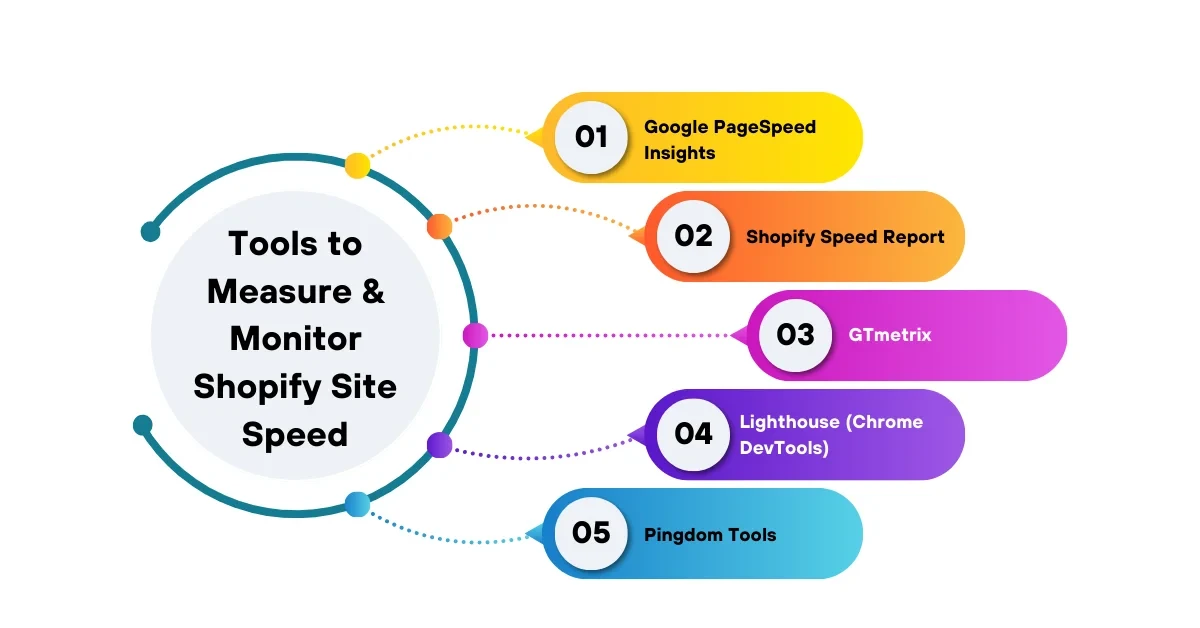
Google’s Page Speed Insights tool is quick and free. Just type in your URL, and it tells you how your store performs on mobile and desktop.
You’ll find this inside your Shopify admin. It gives you a performance score based on your theme, app usage, and content. It’s basic, but it helps you spot changes over time.
GTmetrix gives a deeper look than Google. It shows what files are taking the longest to load, if your images are too big, or if your theme’s scripts are messing with your load time.
If you’re using Chrome, you can download the Lighthouse tool. With it, you’ll get a report with scores for performance, accessibility, and best practices. It is good for developers doing a deeper cleanup.
Similar to GTmetrix, but a bit more visual. It breaks down file sizes and requests so you can see which elements are slowing down your Shopify store.
Speed can impact your sales. And that’s true! In 2025, speed is not a technical metric, but is directly related to sales. If someone lands on your product page and it takes forever to load, they’ll bounce. You don’t need a complicated audit to figure that out.
You should, for example, just think like a shopper. And that is why speed optimization should be part of every great Shopify website development plan. Even a few seconds can make a noticeable difference in conversions, the bounce rate, and even how much you pay per click on ads.
The following are some of the benefits of a faster store:
If your store is doing everything right, good design, good products, active ads —but results are flat, speed is the one thing you should fix first.
If you have been on Shopify for a while now and know how to operate its dashboard and theme functions, you can optimize your Shopify store. But sometimes, DIY modifications are not sufficient to achieve the desired results. And that’s true, we have met so many clients who do the same, but later hire an agency to do that. So, it’s completely your call, but if your store is in good health, it’s time to consider Shopify speed optimization services.
A reliable Shopify website design agency, like Appco Software, will audit your store, remove the junk, and keep what works. They’ll run speed tests, check for script conflicts, and do the stuff that usually takes days to figure out on your own. As a full-service digital marketing company in Jaipur and a Shopify website development company, we have gained a solid reputation and client base over the last few years. We have worked on more than 5000+ projects and delivered successful results.
Tip: If you’re not sure where to start, most Shopify speed optimization service providers offer free audits. Start from there. You’ll get a full report and know exactly what’s slowing you down.
At the end of the day, if you want better results from your store, more traffic, more sales, and lower ad costs, you would definitely want to optimize it because a slow site pushes customers away before they even see what you’re selling. But the good news is, most speed issues are fixable.
If you are looking for solutions to speed up your Shopify store, follow this guide. Or if you are not that much of a technical person, our team can help you do that for you. Just drop us a message or call us, and we will get back to you soon.
Ideally, it should take less than 3 seconds.
Yes. Especially if you’re not using them. You should remove the extra code that is used by each app.
Definitely, yes. By compressing images, reducing homepage content, and deleting the unused apps, you can speed up your Shopify store.
You should check the speed of your store at least once a month, or anytime you add an app or custom feature.
Not really. Speed optimization is a long-term process, like updates, audits, and cleaning up the junk over time.
Error: Contact form not found.

Appco Software has been around for a very long time, helping startups and established brands build iconic websites and apps. For your unique idea to be presented in a beautiful way, contact us now!