

Every second your Shopify store takes to load, you lose 7% of your conversions, according to Google. A store that takes 5 seconds to open on a phone loses 35% before a single shopper even sees the homepage.
Most store owners never connect the dots between a slow Shopify store and falling sales. They run more ads. They redesigned the homepage. They switch suppliers. The real problem is sitting in a PageSpeed report nobody opened. The average Shopify store scores between 35 and 55 on mobile. The top 10% score above 70. That gap is not talent or budget. It is a handful of speed problems most stores share, and almost all of them are correctable without a full rebuild.
Let’s understand why your Shopify store is slow.
Speed has always mattered. But in 2026, it matters even more because Google made it official. Shopify Core Web Vitals are now a confirmed ranking factor. If your Shopify website speed is poor, Google ranks it lower than a faster store selling similar products. You are not just losing shoppers. You are losing the organic traffic bringing them in the first place.
A Shopify loading slow problem hits hardest on mobile. 53% of mobile users leave a page taking more than 3 seconds to load (Google). Your mobile visitors are already the least patient. Every second your store makes them wait is a second someone else is not making them wait.
Wondering why my Shopify store is slow when others in your category seem to load instantly? You might have a slow Shopify website problem if:
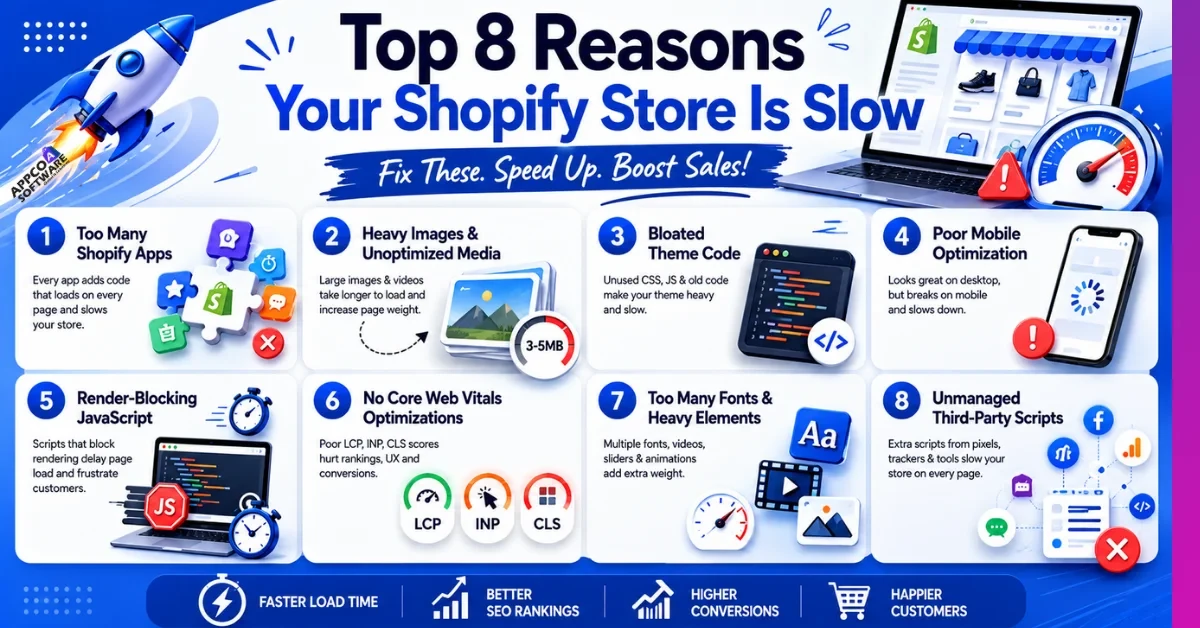
You added an app for pop-ups. Then one for reviews. Then one for a countdown timer, a size guide, a currency switcher, and a loyalty program. Each one felt like a good idea at the time. The problem is that every single app loads its own code on every page of your store, even pages where it does nothing useful at all.
Most stores have six apps running. Some have ten or twelve. That is ten different sets of code loading every time someone visits. No wonder the store drags. Shopify speed optimization does not always mean touching code. Sometimes it just means opening your app list, being honest about what you stopped using, and hitting delete.
This is the one most store owners do not see coming. A photo taken on a decent phone or camera is normally 3 to 5MB. Upload ten of those to a product page, and you have 40MB of images a visitor’s phone needs to download before they can see your product clearly. A visitor on a mobile connection does not have the patience or the data for that.
Shopify page speed optimization delivers its biggest gains right here, in the images folder. Converting to WebP format, compressing before uploading, and turning on lazy loading so images below the fold only load when a visitor scrolls to them. Image compression alone reduces page weight by 20 to 40% without any visible quality drop.
Every theme collects dust over time. Old CSS nobody uses. JavaScript written for features removed two updates ago. Styling rules left behind from a layout your store no longer runs. Most store owners never open the theme code, which means nobody ever removes any of this.
Shopify site speed optimization through theme optimization means:
A heavy theme makes every page load a little slower. And when thousands of people visit your store every month, those small delays can turn into lost sales.
Here is the thing most store owners miss. They build their store on a laptop, test it on a laptop, and it looks great. Then someone opens it on a phone with average mobile data, and the experience falls apart completely. A popup taking over the whole screen. An animation so heavy the page stutters. Buttons are jumping around as the page loads.
The most direct way to improve Shopify page speed is to open your own store on a regular Android phone, not the latest iPhone, not a desktop simulator, or an actual mid-range phone. You will immediately see what your customers see. Then build and test for that experience first, and desktop second.
Now, this one sounds technical, but it is pretty simple. Some scripts on your store have to fully load before the page can show anything at all. The customer taps your link and sees a white screen while the browser finishes reading a script in the background. By the time the page appears, they are already frustrated or already gone.
Shopify performance optimization for JavaScript means telling those non-essential scripts to wait. Load the page first, show the products first, and let the extra stuff load after. Remove scripts from apps you deleted months ago but forgot to fully uninstall. Check whether your chat widget, affiliate tracker, and analytics tools all genuinely need to run on every page.
Google grades your store like a report card. Three scores. LCP measures how fast your main content appears. INP measures how quickly your store responds when someone taps or clicks something. CLS measures whether things on the page jump around while it loads. These three together are your Shopify Core Web Vitals.
For every 32 milliseconds slower your store responds to a click, conversions drop by 1.5 percent, according to Shopify. Most store owners have no idea what their scores are because they have never looked. Open Google Search Console, go to the Experience tab, and spend five minutes reading what Google has already figured out about your store. It is free information and most people ignore it completely.
Three different font styles. A full-width video on the homepage. An image slider with eight photos cycling every two seconds. A scrolling animation on the hero section. Each one was a nice design idea. All of them together are quietly destroying your load time.
Every font family is a separate file your visitor’s browser needs to download before the text even appears. Videos on mobile eat through data and take forever to buffer. Sliders load every single slide upfront, even the six slides nobody ever reaches. A simpler design is not a boring design. In most cases, it is just a faster one.
At some point, you added Facebook Pixel. Then Google Analytics. Then, a heatmap tool. Then a survey widget. Then a script from an affiliate campaign you ran eight months ago. All of these are still running. On every page. Every visit. Without anyone checking whether they still need to be there.
Go through every third-party script loaded on your store and ask one simple question: is this still earning its place? A script from a campaign ending last year has no reason to slow down your current visitors. Tools only needed on the checkout page have no business loading on your homepage. Audit it once a quarter and remove anything not actively contributing to how your store performs.
You do not need to be a developer to check your store speed. Use these free tools:
| Tool | What It Measures | Best For |
| Google PageSpeed Insights | Mobile and desktop speed score | Quick first check |
| Google Lighthouse | Detailed performance breakdown | Deep technical audit |
| GTmetrix | Waterfall chart of every loading file | Finding heaviest elements |
| Pingdom | Speed from different global locations | International store testing |
You should aim for a load time under 3 seconds and a Shopify speed score above 60 on mobile. In fact, the top 10% of Shopify stores hit above 70 consistently. These tools will tell you exactly where yours stands.
Yes, Shopify speed directly affects SEO. Google uses Core Web Vitals as a ranking signal, which penalizes organic visibility if your site does not perform well. A slow store gets pushed down in search results for the same keywords that a faster store ranks for. Shopify SEO speed optimization is not separate from regular SEO work. They are the same work.
A slow store also triggers higher bounce rates, and higher bounce rates tell Google the page is not satisfying searchers. Both factors compound over time and pull rankings down consistently.
You can handle some of this yourself: removing apps, compressing images, and checking Google Search Console. But:
A Shopify speed optimization service will save you time and get better results. Improving page speed from 8 seconds to 2 seconds can lift mobile conversions by up to 74%. At any meaningful revenue level, the investment pays for itself.
We have seen stores doing everything right, good products, decent traffic, solid branding, but still converting poorly. Nine times out of ten, the store is just slow. Appco Software has spent 13 years sorting out Shopify speed problems for D2C, fashion, jewelry, and lifestyle brands.
Here is what our team covers:
Want to know what is slowing your store down? Get a free Shopify speed audit and find out exactly where the problem is.
Usually, it is apps. Install six of them, and each one loads JavaScript on every page. Add large product photos on top of that, and your store never had a chance.
Delete apps you stopped using. Compress images before upload. Switch to WebP. Those three alone shift the score more than most people expect.
Dawn is one of the fastest Shopify themes, which is also free. This theme is built by Shopify and scores better than most paid themes on mobile. Before buying any theme, run the demo URL through PageSpeed Insights first.
Yes, directly. Google scores your store on speed and uses it in rankings. Slow stores also lose more visitors, which makes the ranking problem worse over time.
Anything above 60 on mobile is a good Shopify speed score. Above 70 puts you in the top 10%. Getting under 2 seconds of load time is where sales actually start picking up.
Shopify speed optimization takes around 1-5 days. But basic fixes can be done within a few hours.
Error: Contact form not found.

Appco Software has been around for a very long time, helping startups and established brands build iconic websites and apps. For your unique idea to be presented in a beautiful way, contact us now!