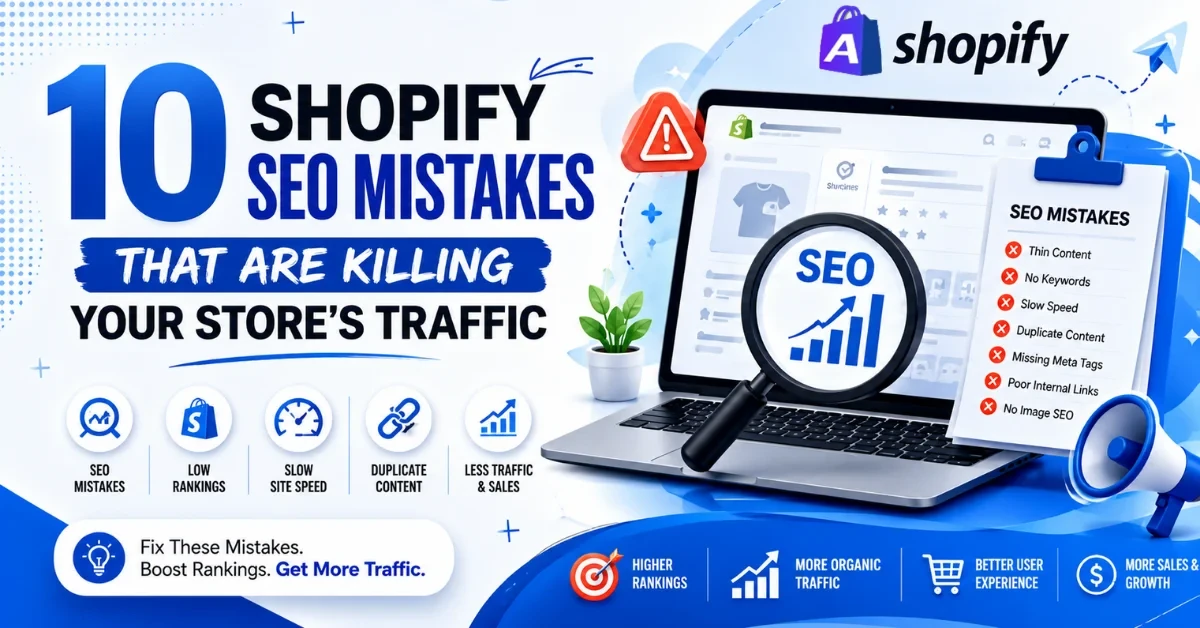
96.55% of all indexed pages on the internet get zero traffic from Google. Most of those pages belong to people who built something decent and then made a handful of avoidable Shopify SEO mistakes that quietly buried them in search results. The store looks fine. The products are good. The brand is real.
However, Google is unaware of this because the product pages are sparse, the collection pages lack content, and the site’s speed is so slow that Google stops crawling halfway through. These are fixable problems.
Here are the ten most common SEO ranking issues, and what to do about each.
Many Shopify stores do not get enough organic traffic because of common Shopify SEO errors hidden inside the website. In fact, most store owners never notice or check these issues.
Things like: wrong keywords, empty collection pages, duplicate product URLs, and images that Google cannot read. Each one cuts into your rankings a little. Together, they can make a well-stocked store invisible on search. These are the ten mistakes doing the most damage.
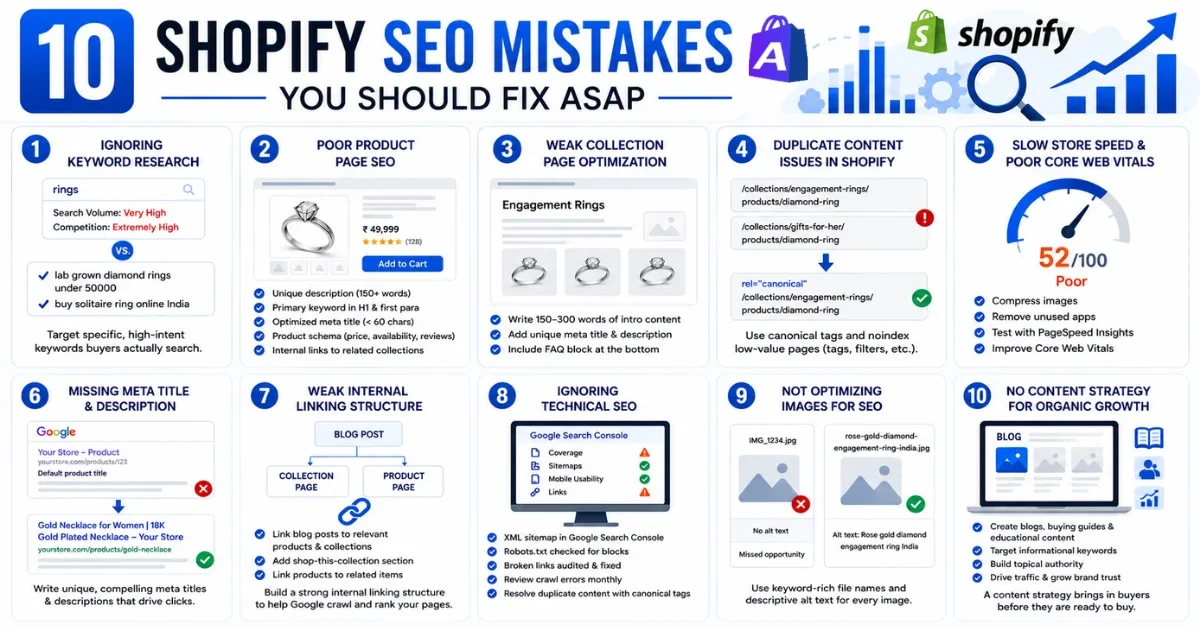
A collection page called “Rings” is fighting every jewelry brand on the internet for one generic word. You will not win that fight. Nobody wins that fight. The stores ranking on page one for high-value searches got there because they mapped specific commercial keywords to specific pages, things like “lab grown diamond rings under 50000” or “buy solitaire ring online India.” Someone typing that is already opening their wallet. Someone typing “rings” is probably just browsing.
Shopify SEO optimization starts with a keyword map, not content. One primary keyword per page, chosen based on what buyers search, not what you think describes your product. Do this before writing a single word.
Open one of your product pages right now. Read the description out loud. If you are done in fifteen seconds, Google is not going to rank it.
Thin descriptions, copied manufacturer text, no FAQs, no trust signals, no internal links. Shopify product page SEO is not about cramming keywords into two sentences. It is about giving Google enough substance to understand the page and giving the shopper enough information to feel confident before they pay.
Shopify SEO checklist for product pages:
Collection pages can outrank product pages for high-volume category searches. Google treats them as broader topic pages covering an entire category, which makes them some of the most powerful ranking targets in your store. Most Shopify stores leave them empty. No intro content. No meta description. Just a grid of products and a page title.
Shopify collection page SEO means:
Most store owners have no idea this is happening. When a product appears in more than one collection, Shopify creates multiple URLs for the same page. A ring sitting inside both “Engagement Rings” and “Gifts for Her” now has two different URLs showing identical content. Layer on tag pages, filter pages, and variant URLs, and you have a store Google is genuinely confused by.
Shopify duplicate content needs canonical tags pointing to the preferred URL, and low-value pages like tags and filters set to noindex. If you have never checked this, there is a reasonable chance it is already splitting your ranking potential across pages competing with each other.
Slow stores lose traffic in two directions at once. Google ranks them lower because Core Web Vitals are a confirmed ranking factor. Shoppers leave before the page loads and go somewhere faster. A 0.1-second improvement in load time lifts conversions by 8.4% according to Google and Deloitte. For a store doing decent revenue, that is not a marginal stat.
The usual causes: images uploaded straight from a camera at 4MB each, six apps injecting JavaScript into every page, and a theme nobody has touched since the store launched. Shopify speed optimization does not require a full rebuild.
Your meta title is what someone reads on Google before deciding whether to click your store or the one below it.
Duplicate meta titles across product variants, default Shopify titles nobody changed at setup, keyword-stuffed strings reading like gibberish. These are Shopify on-page SEO problems affecting click-through rate directly, and a lower click-through rate tells Google your page is not worth showing.
The formula is simple: get this right and more people click without you changing anything about your rankings.
| Factors | Bad Meta Title | Good Meta Title |
| Example | Gold Necklace | Store Name |
| Characters | 24 | 58 |
| Keyword | Missing | Included |
| Benefit | None | Price clarity |
| Click Motivation | Low | High |
Blog posts are published with no links pointing from them to any product. Products are never referenced anywhere except the collection grid. Collections are never mentioned in any blog or other page. These pages exist in your store but barely exist for Google.
Internal linking is one of the fastest ways to improve a Shopify store’s ranking without any external effort.
Broken links, Shopify indexing issues, pages accidentally set to noindex, an outdated sitemap, and crawl errors piling up in Google Search Console. Most store owners have never opened the Coverage report. Some have never logged into Search Console at all.
Shopify technical SEO is not glamorous work. But a store with 30 broken links and three key pages that Google cannot index is actively sabotaging itself while the owner spends money on ads to compensate.
Technical SEO mini-checklist:
Google cannot see your product images. It reads the file name and alt text you give it and uses both as signals to understand what the page is about. Most Shopify stores upload images straight from a phone or camera with auto-generated file names and no alt text added.
An image renamed to rose-gold-diamond-engagement-ring-india.jpg with a descriptive alt text gives Google one more keyword signal for that page. Across a 500-product catalog, the difference between ignored image files and properly named ones is the difference between 500 missed opportunities and 500 additional ranking signals. It takes time. It costs nothing. It compounds.
There are only so many commercial keywords in any niche. Once every product and collection page is optimized, organic growth from those pages levels off. Brands stuck at that ceiling are almost always the ones with no blog, no buying guides, no educational content, pulling in shoppers before they are ready to purchase.
Shopify SEO services worth paying for always include a content plan alongside technical and on-page work. Topics like Shopify conversion rate optimization services or how to choose the right Shopify development company in India attract people weeks before they purchase.
By the time they are ready to spend, your company is already familiar. Organic traffic from content compounds over time in a way product pages alone never will. The stores building content libraries right now are the ones owning category searches twelve months from now.
Before hiring a Shopify SEO agency or running an SEO audit, check these yourself:
| What to Check | Tool to Use | Priority |
| Keyword mapping per page | Ahrefs / Semrush | High |
| Product page descriptions | Manual review | High |
| Collection page content | Manual review | High |
| Duplicate content and canonicals | Screaming Frog | High |
| Mobile PageSpeed score | PageSpeed Insights | High |
| Internal link structure | Ahrefs / GSC | Medium |
| Technical SEO: sitemap, robots.txt | Google Search Console | High |
| Image file names and alt text | Manual review | Medium |
| Schema markup | GSC Rich Results Test | Medium |
| Content calendar | Manual planning | Medium |
Start with a full SEO audit. Google Search Console shows crawl errors and indexing issues for free. A PageSpeed Insights test shows where your load time is going. An Ahrefs or Semrush crawl shows duplicate content, broken links, and missing meta tags across your entire store.
Work in this order:
Most Shopify stores see ranking improvement within 60 to 90 days of consistent SEO optimization. So in short, improve Shopify store ranking by doing the fundamentals properly, not by chasing shortcuts.
Appco Software is one of the best Shopify SEO service companies in Jaipur. We are a certified Shopify Partner with 13+ years of experience running SEO campaigns and store optimizations for D2C, fashion, jewelry, and lifestyle brands. Small Shopify SEO mistakes compound quietly over months until your traffic is half what it was and your ad costs are double. Every mistake on this list is correctable. Most take days, not months.
Here is what our team covers:
Want to know exactly what is hurting your Shopify traffic? Get a free Shopify SEO audit and find out which issues are costing you rankings right now.
Yes, if you set up properly, Shopify gives you fast hosting, sitemap generation, canonical tags, and good SEO apps. But the platform does not do the SEO work for you. You still have to set things up the right way.
There are a few common reasons. Thin product descriptions that say nothing useful. Duplicate content is coming from how Shopify builds URLs. Pages are loading too slowly. Missing meta tags. Sometimes, Google is not even crawling your important pages because of indexing blocks you did not know were there. Open Google Search Console and that will show you exactly where the problem is.
Give it 60 to 90 days for early signs of movement. For real traffic growth, think 4 to 6 months of consistent work. SEO builds on itself over time, so starting early always pays off more.
Duplicate content from multiple product URLs is a big one. Collection pages with no real content on them. Store speed is too slow. No schema markup anywhere. And having zero content strategy outside of product pages. Most store owners have no idea these issues are quietly hurting their rankings every single day.
Start with Google Search Console. Then run PageSpeed Insights. Rewrite your product descriptions so they are useful and keyword-focused. Add some good content to your collection pages; even 150 to 300 words makes a difference. Fix your image file names and alt text. Do these five things first before anything else.
For basic stuff, no. You can sort out quite a bit yourself. But technical SEO, schema setup, fixing duplicate content properly, and building a real content strategy, that is where a Shopify SEO agency saves you a lot of time and stops you from making expensive mistakes.
Error: Contact form not found.
Appco Software has been around for a very long time, helping startups and established brands build iconic websites and apps. For your unique idea to be presented in a beautiful way, contact us now!