
Free Audit Report →

Shopify Speed Optimization Services: How to Identify Problems and Improve Store Performance

appcosoftware.com > Blogs > Page Speed Optimization > Shopify Speed Optimization Services: How to Identify Problems and Improve Store Performance

Your Shopify store was probably very fast at the time of launch. You only had a handful of products running on a clean stock theme without any extra tracking scripts. But things started slowing down six months later when you added a loyalty app and a review widget. A chat bubble and a custom size guide also joined that list eventually. The store is still running fine today, yet that original speed is completely gone.

Speed problems for established brands always start exactly like this. You never make one single bad decision that ruins the store performance. The digital weight just builds up slowly over time. You might be looking at different Shopify development services right now to figure out why your scores are dropping.

This guide covers that entire diagnosis process for you. We explain how to find the root problem and what those technical metrics mean. You will understand clearly what professional Shopify speed optimization services can fix for you and what is simply out of everyone’s control.

Why Shopify Store Speed Matters for Established eCommerce Brands

Speed is not just a meaningless technical number. It acts as a direct revenue variable, and Google treats it exactly like that. Slow-loading stores lose sales before a visitor even sees the main product. Organic rankings also drop because Core Web Vitals operate as a confirmed ranking signal now.

  • Shopping Experience and Conversions: Deloitte did a big study where a one-second load delay drops conversions by almost 7 percent. Getting just 100ms of LCP gain adds around 1 percent in total revenue. The whole case for Shopify website speed optimization is purely financial. Speed works as a direct input for eCommerce conversion rate optimization. Fast stores simply convert much better, and that remains the cheapest win available for any brand.
  • Mobile Performance: Indian Shopify shoppers mostly use mobile phones. They operate on mid-range Android devices with standard 4G networks. Desktop scores will always look better than mobile scores on the same store. Getting a 41 score on mobile matters much more than showing a 78 on your desktop.
  • SEO and Organic Rankings: Google strictly uses Core Web Vitals as a ranking signal today. A store showing poor LCP and high CLS ranks way behind faster sites in organic search. Good on-page quality does not save you there at all. Brands using Shopify SEO services that fix these Core Web Vitals see ranking gains very fast. It works quicker than posting new content.
  • Performance During Sales Campaigns: Heavy traffic spikes during sale events expose slow stores completely. In fact, steady traffic hides these underlying issues normally. Speed optimization finished before a big campaign pays off instantly when the actual sale goes live.

How to Check Your Shopify Store Speed

Shopify page speed optimization starts with getting accurate numbers. You need four tools for a complete picture:

Tool What it measures Best for
Google PageSpeed Insights Lab data, Core Web Vitals Diagnostic score with breakdown
Shopify Web Performance report Real user data (CrUX) Actual visitor experience over 28 days
Google Search Console CWV pass/fail by page group SEO impact by page type
Chrome DevTools Waterfall, script timings Finding specific bottleneck sources
  • Test Each Page Template Separately: Your homepage score and collection page score are usually different. Each template loads different apps, images, and scripts. Test one of each before concluding the store.
  • Mobile vs Desktop Scores: Always run both. A gap wider than 20 points normally points to images not optimised for mobile viewports, or scripts that do not defer on smaller screens.
  • Lab Data vs Real-User Data: PageSpeed gives you lab data: a test run on a fixed network connection. The Shopify Web Performance report gives you field data: what real visitors experienced. Lab data is for diagnosis. Field data is what Google sees. 

Our slow Shopify store fixes guide covers what each diagnostic result means.

Core Web Vitals for Shopify: What the Numbers Mean

Google looks at three specific signals to grade your store speed. They measure this exactly at the 75th percentile mark of all page loads. That means 75 percent of your real visitors must hit the passing threshold. A simple average score means nothing to Google. For example, actual Core Web Vitals optimization has to fix all three signals together. You cannot just improve one metric and expect the store to pass.

  • LCP (Largest Contentful Paint): This checks how fast your main content loads. The target sits strictly under 2.5 seconds. Mobile Shopify stores struggle and take 3 to 5 seconds. A heavy hero image without any preloading causes this exact delay.
  • INP (Interaction to Next Paint): This measures how fast the page reacts when a customer clicks a button. You need this under 200 milliseconds. Stores running six or more apps often cross 500 milliseconds easily. Every single app running JavaScript just adds to this delay.
  • CLS (Cumulative Layout Shift): This tracks how much your screen jumps around while loading. The safe limit is under 0.1. Late-loading announcement banners push your content down suddenly. Review widgets and custom web fonts cause these same annoying layout changes.

Also Read – Best Shopify Speed Optimization Tools
Common Shopify Speed Problems and How to Fix Them

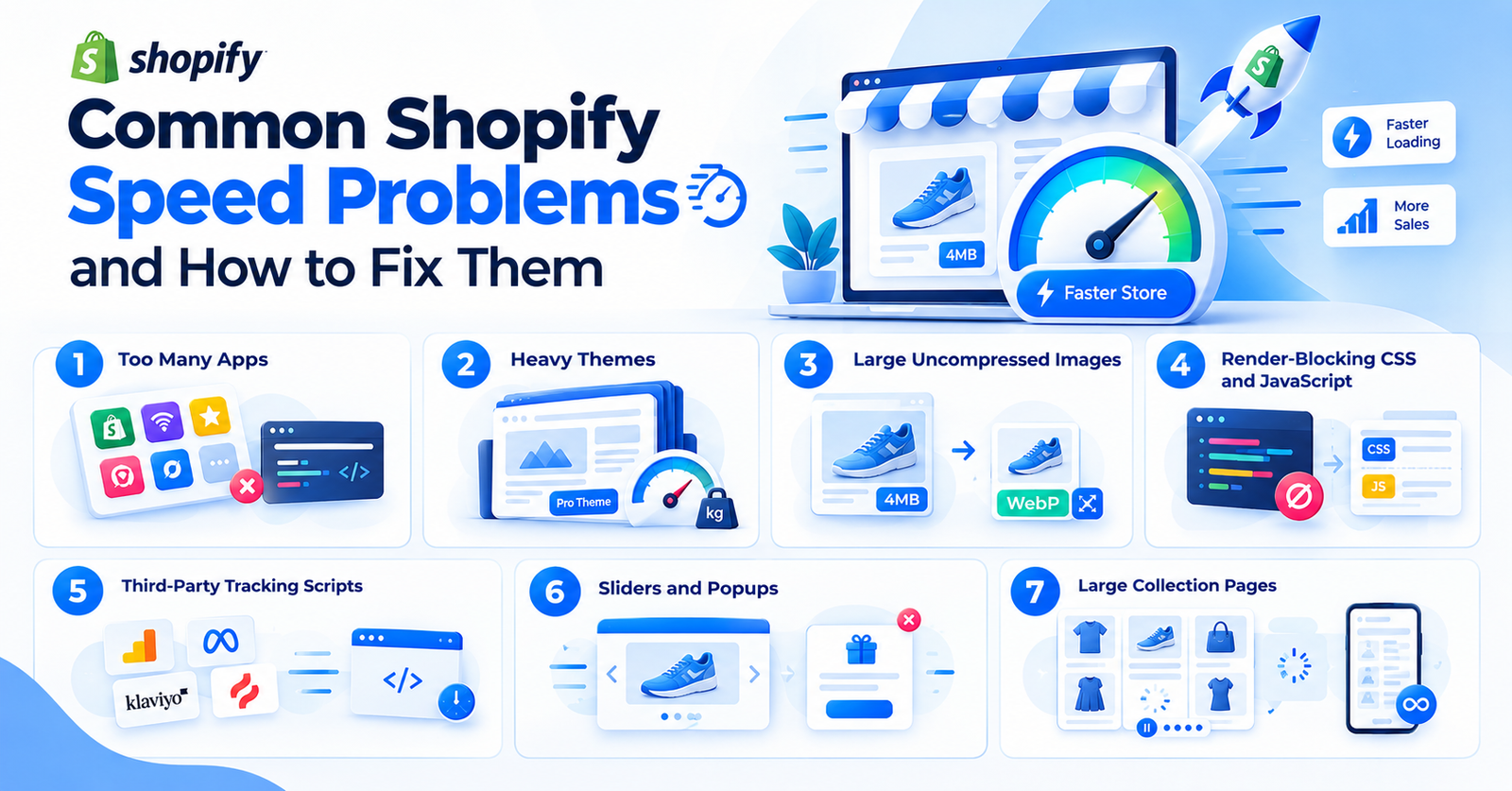
7 Common Shopify Speed Problems

  • Too Many Apps: Every single installed app adds at least one script to your storefront. You might have deleted some app three months ago. Its leftover script tags normally stay behind in your theme code. You must audit your active app list against the actual source code to find and remove them.
  • Heavy Themes: Premium marketplace themes always ship with heavy features. Most stores never even use parallax sections or video backgrounds. Mega menus also add unnecessary weight. A good theme looks fine at launch. It becomes a massive problem later when you start piling more content on top of it.
  • Large Uncompressed Images: Loading a 4MB product image on a basic 4G network hurts your LCP every single time. You need to compress all media to WebP format. Always set exact width and height attributes to stop layout changes completely. Never lazy load that main hero image, which acts as your LCP element.
  • Render-Blocking CSS and JavaScript: Loading scripts in the head section without defer or async blocks the browser completely. It stops the page from rendering quickly. You need to move all low-priority scripts below the fold. Proper Shopify JavaScript optimization goes much further, though. You have to cut duplicate scripts and remove heavy libraries while checking every single app embed.
  • Third-Party Tracking Scripts: Tools like Google Analytics and Meta Pixel add serious weight to your page load. Klaviyo and Hotjar do the exact same thing. Deferring these tracking scripts can easily break your live ad data. You have to test everything properly before pushing those changes to the live store.
  • Sliders and Popups: Auto-playing sliders load multiple heavy images all at once. Popups firing right on page load just add extra script weight. They cause huge layout shifts too. Neither of these are speed-friendly patterns for your mobile users.
  • Large Collection Pages: Collection pages holding 50 to 100 products become the slowest parts of any store. Adding an infinite scroll feature just makes this situation worse. You should paginate the page with a very low product count instead. Lazy loading the products sitting below the fold fixes this issue perfectly.

Also Read – Shopify Website Speed Impacts SEO and Conversions

Step-by-Step Shopify Performance Optimization Process

Step 1: Baseline Audit

  • Run PageSpeed Insights and the Shopify Web Performance report. 
  • Record LCP, INP, and CLS on your homepage, a collection page, and a product page before touching anything.

Step 2: Find the Root Cause

  • Use Chrome DevTools to read the waterfall. 
  • Which resources are largest? 
  • Where are the longest delays? 
  • The score tells you something is wrong. The waterfall tells you what.

Step 3: Prioritise by Impact

  • Fix the biggest LCP causes first. 
  • A 2MB hero image compresses in minutes and can improve LCP by half a second on its own.

Step 4: Fix and Isolate

  • Make one type of change at a time. 
  • If you compress images and remove three apps in the same push, you will not know which drove the improvement.

Step 5: Retest

  • Run the same tools again. 
  • If real-user data has not improved after two weeks, the change may not have affected what matters.

Shopify Speed Optimization Checklist

Shopify store speed optimization isn’t a one-time fix you do and forget. It’s an ongoing process.

The thing is, as your business grows, you are obviously going to add new apps and launch fresh promotional banners. That digital weight always finds a way to creep back in over time. This is exactly why regular maintenance matters so much. Stores that audit their performance on a set schedule manage to hold their passing scores. On the flip side, if you just fix things once and walk away, the site is bound to slow down all over again.

  • Compress all product and banner images to WebP under 200KB
  • Remove or replace apps that embed unused scripts
  • Check for residual script tags from deleted apps
  • Set explicit width and height on all <img> tags
  • Defer third-party scripts where attribution is not affected
  • Preload the LCP image in <head>
  • Paginate collection pages and lazy-load below-the-fold products
  • Test Core Web Vitals on mobile separately from desktop
  • Run the Google Search Console CWV report monthly
  • Retest after every app addition

Is Your Shopify Store Losing Sales Due to Slow Loading?

Identify performance issues, improve Core Web Vitals, and deliver a faster shopping experience with expert Shopify speed optimization services.

Get a Free Speed Audit

What Shopify Speed Optimization Cannot Fix, And What Custom Development Can

Here is the fact that almost no Shopify speed optimization agency will ever mention upfront. You have absolutely zero control over your checkout speed. The cart, the checkout flow, and that final thank-you page are entirely hosted and rendered by Shopify. No third-party speed service can touch them. The only workaround here is Shopify Plus development. Upgrading to Plus is what finally gives you the backend access to edit the checkout and control those background loads.

Then you run into the app script problem. Scripts from app embeds always trigger right after your main theme files. Sure, you can defer some of them to load a bit later. But you just cannot restructure the entire loading sequence the way you easily could on a custom-coded frontend.

The thing is, Shopify’s app sandboxing means certain apps will always drag your speed down. It really does not matter how perfectly your theme is optimized. You might think the easy fix is just deleting those heavy apps, but that normally backfires on the business side. 

  • Dropping a review app instantly kills your store’s social proof. 
  • Removing a loyalty app wipes out your customers’ reward points. 
  • Even pausing certain tracking scripts can completely break your live ad attribution for weeks.

Let us tell you that speed work is different. Any reliable Shopify speed optimization company should sit down and explain exactly what a technical change might cost your daily operations, instead of just hyping up what it gains in loading time.

How Appco Software Shopify Experts Help Improve Store Performance

Appco Software has been building and optimizing Shopify stores for over a decade now,  so we know exactly where the usual bottlenecks hide. We don’t just assume what is slowing your site down. The work starts with a strict Core Web Vitals audit. From there, we dig straight into your theme-level JavaScript and CSS, break down your entire app stack, and handle all the heavy image optimization. More importantly, we retest the live metrics after every single change just to be sure.

If your brand wants to securely outsource Shopify development, we basically manage this entire process from that first audit right through to the final deployment. The thing is, Appco Software Shopify experts never just hand over a vanity score and walk away. 

We deliver a proper diagnosis instead. You get to see the specific code changes, the real business reason behind each one, and the expected speed gain long before any actual work begins. Also, if a problem simply cannot be fixed due to Shopify’s locked backend constraints, we tell you that upfront so there are no false promises.

If you are wondering about the actual budget, our Shopify speed optimization cost guide breaks down the pricing scope clearly for different store types.

Just share your URL with us. We will run a complete Core Web Vitals audit for you and walk you through exactly what is causing the drop.

FAQs

1. What do Shopify speed optimization services include?

Standard Shopify speed optimization services cover a deep app stack analysis and a full theme JavaScript review. You should also expect thorough image audits and proper Core Web Vitals testing across both mobile and desktop. The actual scope varies wildly by agency. You need to ask exactly what gets covered before committing to any contract.

2. How do I know if my Shopify store has a speed problem?

You definitely have a speed problem when your PageSpeed mobile score drops below 50. The same applies if your LCP easily crosses the 3-second mark. Just don’t trust completely on lab scores. You should always check the built-in Shopify Web Performance dashboard to see what your real visitors are actually experiencing on the live site.

3. Does Shopify store speed affect SEO?

Yes, store speed absolutely affects your SEO. Google treats Core Web Vitals as a confirmed ranking signal today. If your store has a poor LCP or a constantly high CLS, it will simply rank behind faster competitors.

4. Can I improve Shopify speed without removing apps?

You can technically improve your speed without removing apps in a few specific cases. Simply compressing heavy images and deferring basic scripts can deliver some real gains. But look, if you have 12 different apps running and your INP sits above 500ms, some app removal is basically unavoidable.

5. How long does Shopify speed optimization take?

A proper optimization task takes anywhere from 3 days to 3 weeks depending on the actual project scope. A heavily focused image and script cleanup runs about 3 to 5 days. On the flip side, a full app and theme audit requiring custom code fixes easily takes 2 to 3 weeks to finish safely.

Error: Contact form not found.

Generic selectors
Exact matches only
Search in title
Search in content
Post Type Selectors