
With a WooCommerce to Shopify migration service, we generally move your current store to a new platform. In this process, all your data, content, products, and, in fact, SEO are taken care of. Nothing is missed. Your search traffic survives only when each old URL points to its new page. That is why the WooCommerce to Shopify migration services at Appco Software start with data and redirects.
Google says rankings can change once you migrate your store. And it is very normal. Let’s understand more about this concept in detail. If you want to migrate your current store, we are here to help. Just call us or send a message, and our team will guide you further.
Good news first, because a lot of your store data can be moved. You should migrate WooCommerce data to Shopify in four parts, and each part has its own method.
But a few things need special care. Passwords and historical orders are on that list, and so are reviews and blog posts. In fact, it is better to decide early how each one will move, because a late decision slows everything after it.
Content is the next thing we look at. To migrate WordPress blogs to Shopify, you export the posts with their URLs and dates, and then import them with an app or a CSV file. Reviews are a little different, so export them before you cancel the plugin.
And before the full migration, run a WooCommerce to Shopify data migration on a small batch. That batch shows which fields break, and it is very normal to find a few. If you want help with it, our team is happy to go through your fields with you.
Also Read – How Do I Migrate My Website to Shopify Without Losing SEO Rankings
Let’s start with the WooCommerce to Shopify migration checklist, because a good migration is mostly preparation. The first thing we do is take a full backup, because everything after that depends on a safe copy. And don’t worry, none of these steps are hard. Here is the list:
In fact, the URL list becomes your redirect map later, so keep it safe. The landing pages tell you which URLs need extra care during the migration.
Now, if you want to migrate WooCommerce to Shopify, decide a freeze date for catalog changes. It is very normal to keep editing the old store, but after that date, those edits will not reach the new one. So use this quiet time for the last two items. Each plugin needs a Shopify answer, and we cover that in a later section.
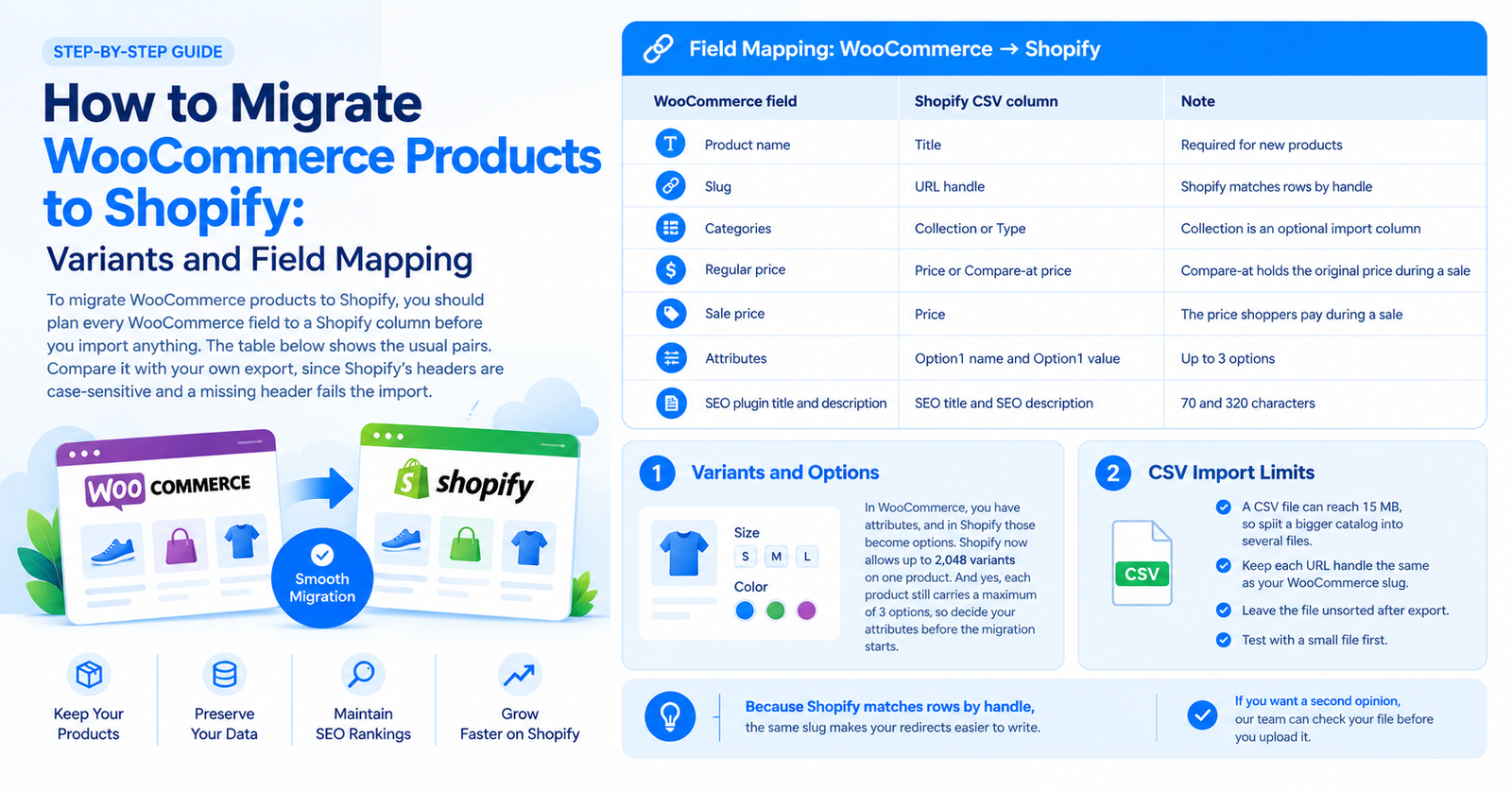
To migrate WooCommerce products to Shopify, you should plan every WooCommerce field to a Shopify column before you import anything. The table below shows the usual pairs. Compare it with your own export, since Shopify’s headers are case-sensitive and a missing header fails the import.
| WooCommerce field | Shopify CSV column | Note |
| Product name | Title | Required for new products |
| Slug | URL handle | Shopify matches rows by handle |
| Categories | Collection or Type | Collection is an optional import column |
| Regular price | Price or Compare-at price | Compare-at holds the original price during a sale |
| Sale price | Price | The price shoppers pay during a sale |
| Attributes | Option1 name and Option1 value | Up to 3 options |
| SEO plugin title and description | SEO title and SEO description | 70 and 320 characters |
Let’s talk about variants first, because this part needs a little care. In WooCommerce, you have attributes, and in Shopify those become options. Here, Shopify has good news for you, because it now allows up to 2,048 variants on one product. And yes, each product still carries a maximum of 3 options, so decide your attributes before the migration starts.
Now, the CSV file. It is simple, but a few limits can surprise you if nobody tells you about them. So let’s go through them:
Because Shopify matches rows by handle, the same slug makes your redirects easier to write. Sorting inside a spreadsheet can lose your images, and once an import starts, you cannot cancel it. So that small test file saves you a lot of stress during the migration. And if you want a second opinion, our team can check your file before you upload it.
To preserve SEO rankings during a WooCommerce to Shopify migration, just point every old URL to its new page. According to Google, WooCommerce to Shopify 301 redirects will not lose any PageRank.
Start with the crawl list from your checklist, and match each old address to its new one. The table shows the format only, so replace it with your own paths.
| Old WooCommerce URL | New Shopify URL | Page type |
| /product/product-name/ | /products/product-name | Product |
| /product-category/category-name/ | /collections/category-name | Collection |
| /blog/post-name/ | /blogs/news/post-name | Blog post |
| /shop/ | /collections/all | Shop page |
Then add the rules in Shopify under Content, then Menus, then View URL Redirects, or import them as a CSV file. They apply right away. But Shopify creates redirects only from URLs that return an error, so a rule will not fire if the old address still loads a page. Its help page also lists /shop, /cart, and /orders among the prefixes it cannot redirect. That is why you should test your shop page before launch.
A Shopify SEO services partner can build this map from your crawl and your Search Console data.
Several WooCommerce features need to be rebuilt on Shopify, because your plugins and themes do not come along with your data. Don’t worry, the list is easy to make. Write down every plugin on the old store, and next to it, the job it does. Then match each job to a Shopify app or a native feature. Start with anything that touches checkout.
But sometimes there is no app for a job. And then you need custom Shopify development to build it. So when you talk to an agency that provides WooCommerce to Shopify migration services, ask them to scope these rebuilds before they quote you, and ask for that list early.
Pre-launch testing means running your WooCommerce to Shopify migration checklist against the new store one last time. It is a boring step, but small problems show up here before your customers see them. This is what we test:
To monitor SEO performance after migration, open Search Console every few days for the first few weeks. Check the Performance report for impressions and clicks. Then the Page indexing report shows new errors, and the Sitemaps report shows how many new URLs Google has read.
A Shopify migration without losing SEO rankings is the goal, and these reports show how close you are. Rankings can dip early, and Google gives no date for recovery, so judge the trend over weeks. If errors spike, trace them to the redirect map.
WooCommerce to Shopify migration cost depends on the size and complexity of your store, so any fixed price would be an assumption. Catalog size is the main factor, for example. Custom development, integrations and content volume add to it, and SEO complexity are other things to note down. That is why a quote comes after an assessment. Just share your store details with Appco Software, and we will review them.
You should hire a WooCommerce to Shopify migration agency when organic search brings in a large share of your sales, because a redirect mistake then costs real revenue. It helps pay off when custom plugins run key features. But a small store with simple products can manage alone with a good checklist.
A checklist is easy to read, but it is hard to finish alone, especially when your live store keeps taking orders. So that is where you can hire a full-service Shopify agency. Appco Software is a Shopify company based in Jaipur, with 13+ years of experience and 5,000+ Shopify projects delivered.
We work in the same order as this article. First, we take care of your data, and then the redirects. And before launch, we test the full store. When your store needs something no app covers, our custom Shopify development team builds it.
Just get in touch with Appco Software and let us manage your Shopify project end to end.
Yes, you can migrate WooCommerce to Shopify with little loss when redirects and sitemaps are right, but nobody can promise your rankings remain unchanged.
To migrate WooCommerce products to Shopify, you export the catalog and map each field to a Shopify CSV column. Then you import files under 15 MB, or you let a migration app handle it.
Your customer data and order history will transfer through a migration app or CSV, so basically the records move over. Passwords need special handling, so shoppers may set new ones.
You need 301 redirects when migrating to Shopify, because old URLs return errors without them. Google also says permanent redirects do not cause a loss in PageRank, so shoppers still reach the right page after launch.
A WooCommerce to Shopify migration takes as long as your catalog size and testing needs, so ask for a timeline after an assessment.
Blogs from WordPress do not move on their own, so you export the posts and import them into a Shopify blog with an app or CSV. Then you redirect each old post URL.
Yes. A large WooCommerce store migrates to Shopify through product CSV files under 15 MB, data moved in batches, and redirects tested against your full URL list before the launch date.
Error: Contact form not found.

Appco Software has been around for a very long time, helping startups and established brands build iconic websites and apps. For your unique idea to be presented in a beautiful way, contact us now!